
How to Calculate True RMR Growth Rate for Your Alarm Company

If you run an alarm company and you’re not tracking your growth numbers, you’re basically guessing your way through business. You might see money coming into your account every month and think everything is fine, but that does not tell you whether your company is actually growing or just getting by.
Alarm Company Service Software: Manage Leads, RMR Billing, Dispatch & Service in One Place can help you manage your recurring revenue numbers more effectively, making it easier to track your growth over time.
For most alarm business owners, Recurring Monthly Revenue (RMR) is the single most important number to watch. It reflects the health of your business and directly affects what your company could sell for if you ever decide to exit. But here’s the issue: many owners simply add up the total cash they receive and assume that reflects their RMR growth. That’s not how it works.
In this guide, we’ll walk you through exactly how to calculate RMR growth the right way, so you can stop guessing and start making confident decisions for your company.
Field service management software keeps office and field teams connected in real time. When a technician completes an installation, updates flow directly into your billing system without the need for manual data entry.
In this guide, we will explain what field service management is from an alarm industry perspective and show you why specialized tools make a real difference. You will also see the two primary types of systems used in the alarm industry and how each one impacts daily operations.
What Is RMR in Alarm Companies What Does RMR Stand For?
RMR stands for Recurring Monthly Revenue, and in the security industry, it is the clearest indicator of a company’s long-term health. It represents the predictable, contracted income your subscriber base generates each month.
Project-based work comes and goes, but RMR provides the steady cash flow needed to cover operating costs, invest in new technology, and increase your business’s overall value for a potential exit.
If scaling is the goal, using specialized Alarm Company Service Software is one of the most effective ways to efficiently manage revenue, billing, and customer data.
RMR vs. One-Time Revenue
It is easy to confuse total cash flow with growth, but they are not the same. One-time revenue includes installation fees, equipment sales, and individual service calls. These provide immediate income but do not contribute to the valuation multiples that buyers look for.
RMR, on the other hand, consists of ongoing fees for monitoring, maintenance, and cloud-based services. To build a valuable and scalable business, your strategy should focus on converting one-time installations into long-term recurring contracts.
RMR vs. EBITDA
While RMR measures your top-line revenue, EBITDA (Earnings Before Interest, Taxes, Depreciation, and Amortization) reflects your actual profitability.
A company can have strong RMR but still struggle if operating costs and customer acquisition expenses are too high. Investors evaluate both metrics together. RMR shows the amount of contracted revenue secured, while EBITDA indicates how efficiently the business operates.
High-value companies maintain a balance between consistent RMR growth and controlled operational costs.
Example of RMR Growth Calculation
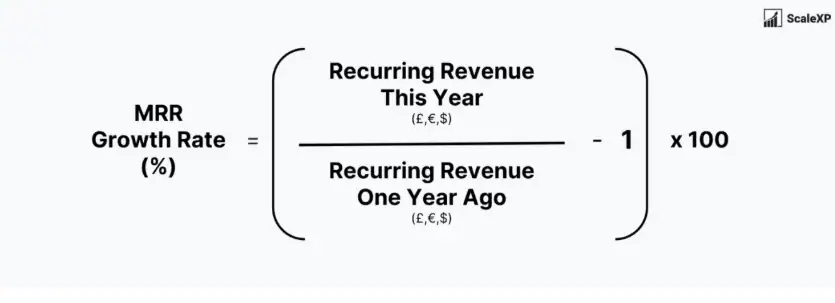
Here is a simple example of how to calculate RMR growth.
To calculate the growth percentage, subtract your starting RMR from your ending RMR. Then divide that result by the starting RMR and multiply by 100.
For example, if your company started the month with $20,000 in RMR and ended with $21,200, the net increase is $1,200.
($1,200 ÷ $20,000) × 100 = 6%
In this case, the monthly RMR growth rate is 6%
How to Increase RMR for Alarm Companies
Growing recurring revenue does not always require acquiring new customers. You can increase RMR by upselling existing clients on additional services such as smart home features, video verification, or mobile app access.
Small, standardized annual price adjustments can also help maintain profit margins and offset rising operational costs.
Service plans are another effective strategy. They convert occasional repair work into predictable monthly revenue, helping stabilize income and improve resource planning.
To manage these accounts effectively and maintain accurate billing, automation tools such as WorkHorse SCS can support consistent tracking, invoicing, and payment management.
What Counts as RMR in an Alarm Company
Not every dollar a customer pays you counts as recurring revenue. If you mix one-time sales with your monthly contracts, your growth rate may look stronger than it really is, leading to poor planning decisions.
If you’re looking for a streamlined way to track all your RMR revenue, RMR Software for Alarm Companies: Streamline Billing, Service & Operations offers a comprehensive solution that can keep everything in one place, including service subscriptions and maintenance contracts.
- Monitoring Service Subscriptions: This is the core of your RMR. It includes the steady fees customers pay for 24/7 central station monitoring.
- Maintenance or Service Contracts: If a client pays a fixed monthly fee to cover future repairs or battery swaps, you can count it as recurring income.
- Long-term Recurring Billing: Any other service billed on a set schedule, such as cloud video storage or mobile app access, belongs in this category.
You must exclude one-time installation fees, equipment sales, and any repair jobs that you bill just once. These one-time sales and repair services are great for cash flow, but they do not add to the long-term value of your company because they don’t repeat automatically next month.
How to Calculate RMR Growth Rate Step-by-Step
Measuring your growth is not just about seeing a higher number; it is about seeing the percentage of change over a specific time. The calculation helps you compare your performance this year against last year, even if the market conditions have changed. To get a clearer picture of your progress, RMR Software That Doesn’t Miss a Beat: Finally, a System Built for Alarm Companies could help you maintain accurate tracking for your revenue growth, ensuring you’re making the right decisions for your business.
To get a clear picture of your progress, follow these four simple steps.
Step 1: Identify Your Starting RMR
First, pick a starting point. Most owners look at the beginning of the year or the beginning of the month. Go to your billing software and pull the total amount of contracted recurring revenue you had on that specific date. Do not include any taxes or late fees in this number. That total recurring revenue amount becomes your baseline.
Step 2: Track Your Ending RMR for the Selected Period
Now, look at the same data for the end of that period. If you started your check on January 1st and are tracking a month of growth, review your numbers on January 31st. You want to see the total value of your active subscriptions after adding new customers and removing those who canceled.
Step 3: Apply the Growth Rate Formula
Once you have these two numbers, the math is straightforward. Subtract your starting RMR from your ending RMR. Take that result and divide it by the starting RMR. Finally, multiply by 100 to get your percentage.
For example, if you started with $10,000 and ended with $10,500, you gained $500. Divide $500 by $10,000 to get 0.05. Multiply by 100, and you have a 5% growth rate. This simple process is how to calculate your RMR growth without a complex spreadsheet.
Step 4: Review the Result and Interpret the Numbers
A positive number means you are growing, but you still need to determine whether that growth rate is strong enough to meet your goals. If your growth is 2% but your labor and gas costs increased by 5%, you are actually losing money.
If your growth rate stays flat, it means you’re gaining new customers but losing old ones at roughly the same pace. Your sales team may be bringing in new business, but those gains are being offset by customers who are leaving.
Many owners ask, “how do you calculate RMR that accounts for these losses?” The answer lies in comparing your “net” numbers with your “gross” numbers.
Gross RMR vs Net RMR
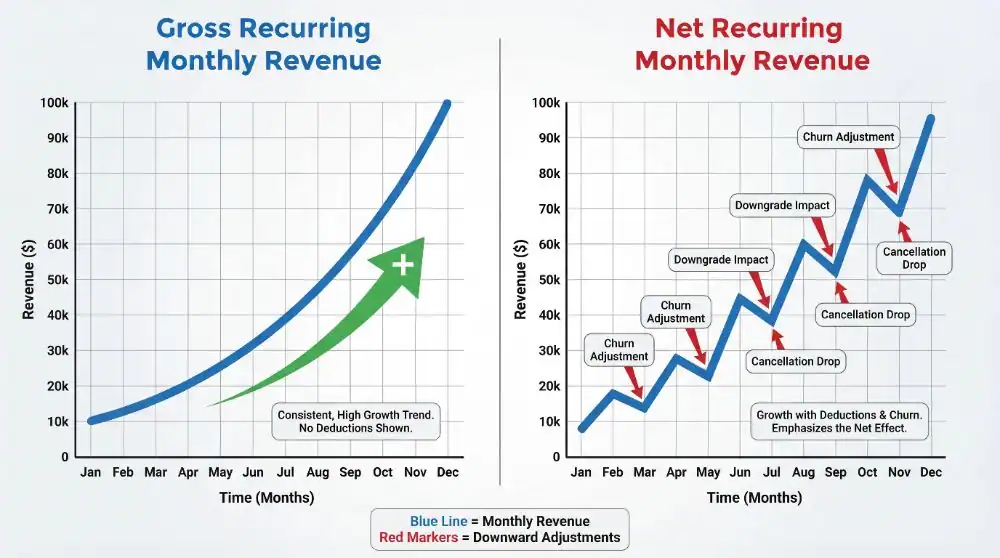
There is a big difference between the money you bill and the money you actually keep. Tracking your net RMR is crucial, as it allows you to see past the gross income and focus on the actual profits. If you need assistance in managing your RMR effectively, Need Cash? How Your RMR Can Be a Lifeline offers helpful insights on using RMR to improve your cash flow. Gross RMR is the total amount you invoice your customers. Net RMR is what remains after you pay the costs directly tied to those accounts.
To measure true growth, track your Net RMR. This means you subtract the costs you have to pass on to other services. For example, if you bill a customer $35 but pay $8 to a monitoring centre and $2 for a cellular connection, your net RMR is $25.
If your vendors raise their prices, your Gross RMR may remain the same, but your Net RMR will decline. If you only track gross revenue, you may overlook the fact that your profit margin is shrinking. Tracking both helps you determine whether your price increases are working or simply covering your rising vendor costs.
Common Mistakes That Distort Your RMR Growth Numbers
It’s easy to get excited about new sales, but you need to be honest with your data. Here are the most common mistakes that can throw off your growth calculations.
Ignoring Customer Cancellations
Attrition is the rate at which customers cancel their service. If you add $500 in new RMR but lose $400 from people moving away, your growth is only $100.
Looking at Just One Month
Alarm companies often see higher sales in the summer, when people are moving, and fewer in the winter. If you only look at one month, you might panic or get too confident. That’s why it’s better to look at your numbers over a full 12 months to get a more accurate picture.
Mixing Equipment Costs with RMR
Don’t mix equipment giveaways with your RMR tracking. Some owners give free equipment to customers in exchange for a higher monthly fee.
While that approach increases RMR, it also creates a high upfront cost. If you don’t include equipment cost in your RMR calculations, your growth rate will look good on paper, but your actual cash flow will not reflect that.
Conclusion
Accurate RMR growth reflects the true health of your alarm company. When tracked correctly, it allows you to move beyond the daily pressure of service calls and installations and concentrate on building long-term value.
When you track your true net growth and keep an eye on customer cancellations, you can set realistic targets for your sales team and make better decisions about where your business is heading.
Make it a habit to review these numbers every month. The more regularly you check your RMR, the easier it is to catch problems early before they become bigger issues.
If your growth has slowed or stopped, it’s probably time to review your pricing or improve your customer service to retain more of your existing customers.
Investing in dedicated software for field services is how you move from a hustle to a scalable enterprise. By centralizing your data and automating your billing, you free up your time to focus on sales and high-level strategy.
If you want to see how this system works for your specific business model, check out WorkHorse SCS. We provide the specific tools that alarm dealers need to protect their accounts and grow their revenue year after year.
Frequently Asked Questions
Is RMR the same as MRR?
Essentially yes — MRR (Monthly Recurring Revenue) is the SaaS/tech industry term; RMR is the alarm industry’s equivalent. They measure the same thing.
Can I include annual contracts in my RMR?
Yes — divide the annual contract value by 12 to express it as a monthly equivalent and include it in your RMR base.
What’s a good attrition rate for an alarm company?
Best-in-class is under 7% annually. The industry average runs 8–12%. Anything above 14% is a red flag for potential buyers and signals account management problems.
Do monitoring wholesale arrangements count as RMR?
Yes, if billed on a recurring monthly basis — though wholesale RMR typically commands lower valuation multiples than direct dealer RMR because the relationship is with the dealer, not the end customer.
Let us help you streamline your operations and achieve greater success with our all-in-one software solution.

We are your Single Point of Data Entry